Answers from your catalogue, asks your team when it doesn't know.
Zellwo takes the first line on the chat bubble, email, SMS and the search bar. It answers from your catalogue and help articles, checks orders in your own system, and asks your team in Slack when it is stuck. Every answer your team gives is saved as an article, so nobody gets asked twice.
Email from anna@… · verified customer
Do you ship to Norway? And can I change the hoodie to a size M?
The hoodie is in stock in M. Let me check Norway for you.
 Everyday hoodie, size M $59 Add to cart
Question posted · answer due in 4 working hours
Yes, we ship to Norway: 4-6 days, customs included.
@Stefan can you confirm the M is really in the warehouse?
Task for Stefan · unread mention
@bot if Anna hasn't answered by tomorrow 10:00, remind her and offer the L.
Agent follow-up scheduled · tomorrow 10:00
Tomorrow 10:00 · no answer from Anna
Hi Anna, just checking: shall I switch order 6204 to the M, or would the L suit better?
Approval card: switch order 6204 to size M
Approved by Tom · ran once
Saved as an article in every language you sell in
The next shopper gets the answer in the Help tab in a second.
Running on Zellwo



Does the Anker charger work with a MacBook Air?
Yes, it charges the Air at full speed over USB-C.
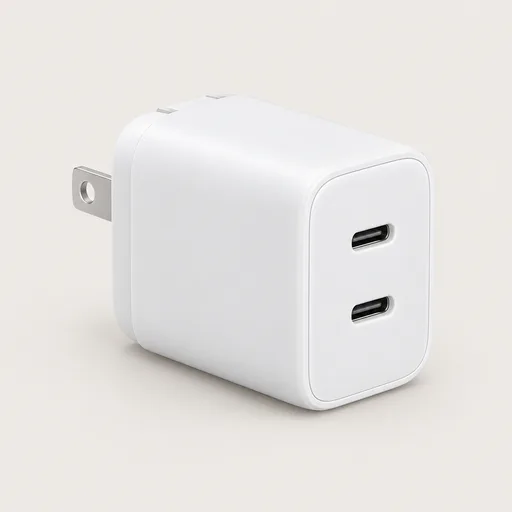 Anker 735 GaN 65W $45 Add to cart
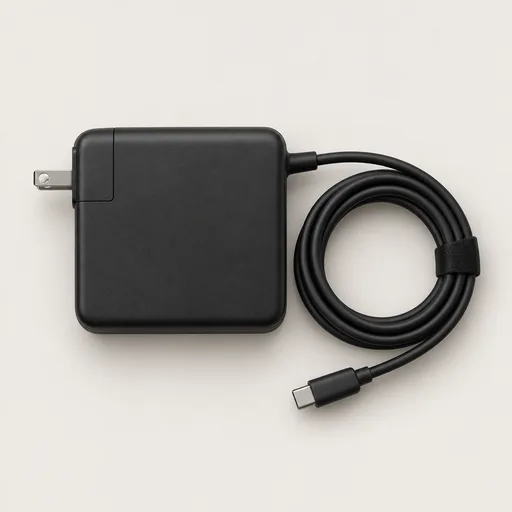 Lenovo 65W USB-C $39 Add to cart
And if it doesn't?
30-day returns, free label. Want me to add it to your cart?
A good shop assistant knows the stock. A great one knows when to ask. Zellwo does both.
- 1
Visitors help themselves
The Help tab in the chat widget opens your articles before anyone has to ask.
- 2
The agent answers
Product, policy and order questions are answered from your catalogue, articles and shop system.
- 3
It asks when stuck
A question it cannot answer goes to your team in Slack, and the reply reaches the customer.
- 4
A person takes over
The ticket joins the Next queue, ordered by reply deadline in your working hours, with the whole conversation.
Learns from your team
It asks when stuck. Then it knows.
When a question is not in your catalogue or articles, the agent asks your team in Slack. Someone answers in one line and the agent carries on with the customer. The answer is saved as an article, so the second shopper who asks gets it in a second, in their own language.
Do you ship to Norway?
Asked the team in Slack
Yes, 4-6 days, customs included in the price.
Saved as an article: Shipping to Norway
Four working hoursNo answer in time? The agent replies from your published policy and tells the team.
Approved before useEach new article waits for your one-click approval, then goes out in every language you sell in.
Hand it to a colleague or to the agentWrite @Stefan in a note and he gets the task; write @bot remind tomorrow and the agent follows up on time, even while it is paused on the ticket.
“The handoff between support and sales is so smooth I can't tell the difference without checking the filters. It talks policy, sells products, and references our customs rules in one conversation.”
Performance
Every channel. Every language.
76%
resolved without a person
90%
satisfaction score
22
languages
Every channel, one inboxChat, email, SMS and the search bar land as tickets on one customer record.
Ask or Always allowSet each order action per department; on Ask an admin approves the card and it runs once.
Learns from every answerEach reply your team gives becomes an article the agent uses next time.
Weak drafts held backA draft that fails your quality check goes to a person with the reason, never to the customer.
Set up
Live in minutes. Answers on day one.
Install the widget on any site or the Shopify app, connect your support email and SMS, and add a Slack channel for the questions it cannot answer. The help articles you already have work straight away.
- 1
Install the widgetAdd the Shopify app, or paste one script tag on any site.
- 2
Connect email and SMSYour support inbox and SMS number land in the same inbox.
- 3
Add a Slack channelThe agent asks your team there when it doesn't know.
Draft-only to startThe agent writes, a person sends, until you trust it to reply on its own.
Flat price, no seatsOne price per store with an allowance of conversations; bring the whole team.
Your articles, day oneThe agent and the Help tab use your help articles from the first conversation.
FAQs
What does Zellwo Support actually do?
It takes the first line on the chat bubble, email, SMS and the search bar. It answers from your catalogue and help articles, looks up and changes orders with your approval, asks your team when it does not know, and hands over to a person with the whole conversation when it should.
What happens when it doesn't know?
It asks your team in Slack. Someone answers in one line, the agent replies to the customer, and it drafts an article you approve, so it knows next time. With no answer in four working hours, it replies from your published policy.
Can it change an order?
Yes, in your own shop system: tracking, returns, refunds, reschedules and cancellations. Each action is set per department to Ask or Always allow; on Ask an admin approves the card and it runs once. It acts only for a verified customer, anyone else gets a sign-in link first.
Can I ask the agent to follow up later?
Yes. A note saying @bot remind the customer tomorrow 10:00 schedules it; if the agent cannot act when the time comes, the task comes back to a person with the reason.
What does it cost?
One price per store with an allowance of AI conversations, cents per conversation above it. No seats, and a free plan to start.
Let the agent take the first line
14-day trial on Grow and Scale · Live in under 30 minutes